KueIt Features
The go-to audio sampler soundboard app for DJs and live performers

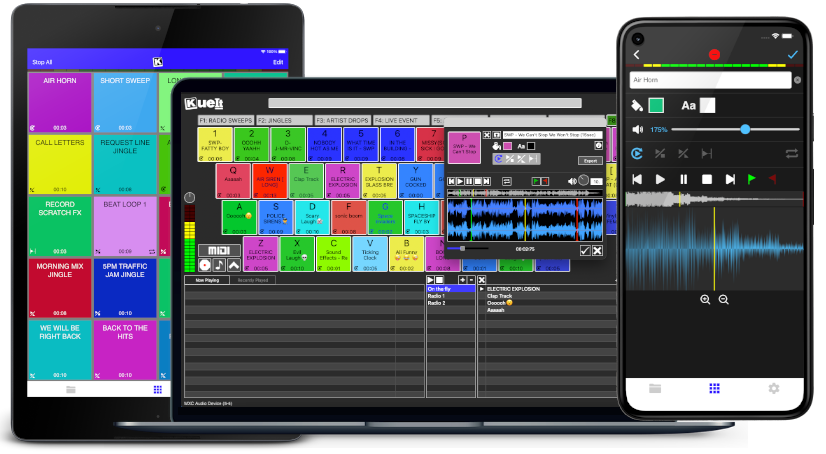
Uniquely designed audio sampler app for your sound effects, audio drops & jingles
The DJ soundboard app is available for macOS, Windows, the App Store & Google Play
30 day money back guarantee for desktop and 7 day FREE trial for mobile devices!!!
KueIt DJ sound effects app can be used in many settings
Replace large bulky machines with this cost-effective DJ soundboard app
KueIt audio sampler app allows you to play all your drops, jingles, and sound effects
Performers, arm yourself with an arsenal of audio files at your fingertips with a handy DJ soundboard app
Instantly trigger the appropriate sound for the big play straight from your computer or mobile device
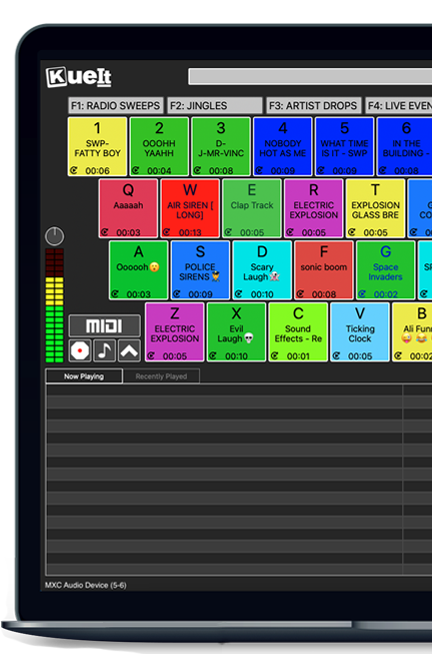
KueIt gives you the flexibility you need. Load your audio tracks to your profile and customize your layout. Trigger your drops, jingles, sound effects and songs instantly by the touch of your fingertips.
Enjoy your very own audio sampler app packed with amazing features

Our cloud covers different sound types including sound fx, voice tracks, beat loops, percussion & more!
* Cloud access is only offered for KueIt Mobile Pro Plan
users
* Pro Plan available via in-app purchase
KueIt was designed for the serious DJ, podcaster, producer, or broadcaster. The easy yet reliable performance of the KueIt soundboard app makes it perfect for podcasts, nightclubs, TV, live concerts, sporting events, school gymnasiums, and anywhere that quality music, jingles, or sound effects are needed. Don't compromise the outcome of your event or broadcast. Go with a DJ sampler app system that works... KueIt.
Easily add audio clips to your profile and play them with zero delay
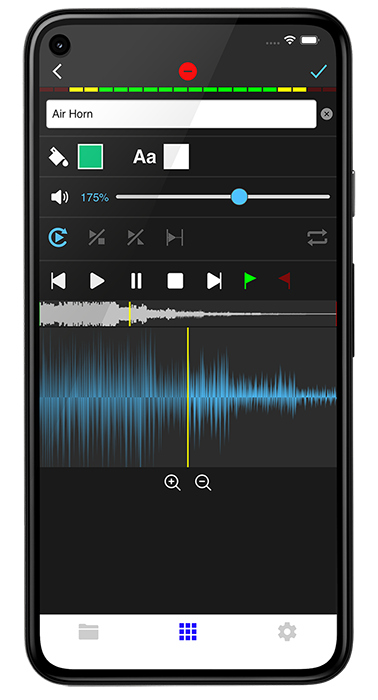
Edit name & volume. Set play mode, set up loops & start/end points via waveform
Instantly play your loaded audio clips at the touch of your fingertips
Get studio quality audio. KueIt also works with external soundcards
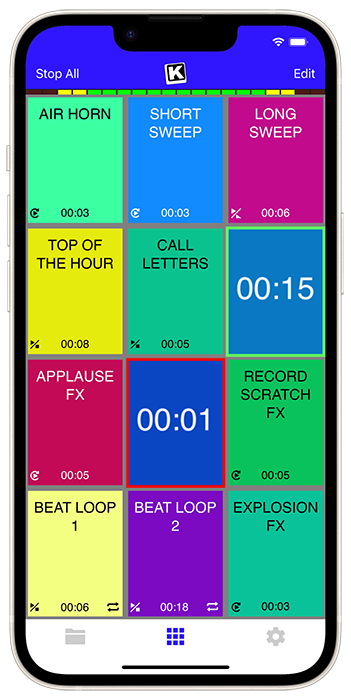
Create custom profiles in the audio sampler app and assign multiple audio clips for each profile
Set the pad color & font color of each pad
Use KueIt on macOS/Windows or iOS/Android phone or tablet
Backup your KueIt profiles via iCloud/Google Drive on mobile or via export on desktop

"KueIt allows DJs to step their game up. You can play like a radio DJ in front of a crowd, KueIt is one of the hottest programs to hit the market"

"KueIt made it easier for me to load up my sounds. No more instant replay"

"KueIt makes my life (DJing on the radio) easier, and it's extremely user friendly. After using it for only a few minutes, I felt comfortable enough to take it to the radio and get busy with it live on the air"
Since Opera Mini is no longer viable, users have limited options:
Option A: Use Internet Explorer 11 Windows Phone 8.1 devices come with Internet Explorer 11 Mobile pre-installed. While also outdated, it is the most stable browser available natively on the OS.
Option B: Third-Party "Wrappers" Before the store effectively froze, some developers released "web wrappers" (apps that use the IE engine but look like other browsers). Apps like UCBrowser were once alternatives, but most of these have also been pulled from the store or suffer from server-side expiration.
Option C: Manual Sideloads (Not Recommended)
While tech forums (such as XDA Developers) may host .xap files for the old Opera Mini, sideloading these files typically requires a developer-unlocked phone. Even if successfully installed, the app will likely crash upon startup due to the lack of server support from Opera.
The short answer is yes, but only via unofficial and complex methods. You cannot simply click “Install” from a website. Your Windows Phone will reject direct .xap or .appx file installations unless you “jailbreak” (unlock) the device.
Opera Mini was once available for Windows Phone 8 via the official Microsoft Store. However, Microsoft officially ended support for Windows Phone 8 on January 12, 2016, and for Windows Phone 8.1 on July 11, 2017. Consequently, Opera Software has discontinued development, updates, and direct distribution for the platform. Direct download from official sources is no longer possible.
Opera Mini for Windows Phone 8 is discontinued and is no longer available in the official Microsoft Store
. While it was a popular alternative during the platform's peak, active development ceased in 2016, and the app has since been removed from modern storefronts. Download Options
Since the official store link is dead, you can only install it through third-party archives if your device is "interop unlocked" to allow sideloading of Official Archive:
You can find older versions of Opera for various platforms on the Opera FTP Archive Legacy Mobile Site: Some legacy files may still be hosted at m.opera.com , though support for Windows Phone 8 is not guaranteed. opera mini for windows phone 8 download
At its height, Opera Mini was highly valued for its ability to browse the web on limited data plans, though it felt like a "second-class citizen" compared to the Android version. Opera forums Extreme Data Savings: Compressed web traffic by up to , making it ideal for 2G/3G connections or roaming. Speed Dial:
A user-friendly home screen with customizable tiles for quick access to favorite sites. Download Manager:
Included a built-in manager that could handle zip files and save images directly to the phone. Offline Reading:
Users could save entire web pages to their Speed Dial for reading without an internet connection. Opera Mini 8.1 for Windows Phone
Opera Mini for Windows Phone 8 is an archived browser that is no longer under active development. While it was a popular choice for data savings and performance on legacy Windows hardware, users today will find its functionality limited as the mobile ecosystem has moved on. Current Status & Download
Opera Mini for Windows Phone reached its stable version in June 2015.
Official Availability: The Windows Phone Store (and the mobile OS itself) is largely defunct. While you can find archived mentions on Opera's official site, the "Windows Phone" version is typically no longer listed as a current download for modern use.
Legacy Version: The last notable version for this platform was Opera Mini 8.1. Key Features for Windows Phone 8
When it was active, Opera Mini was highly regarded for several platform-specific improvements: Since Opera Mini is no longer viable, users
Data Savings: The signature feature that compressed web pages by up to 90%, allowing for faster browsing on 2G/3G networks.
Native UI: Unlike early beta versions, the final release featured a native "Windows Phone" look and feel that integrated with the system's aesthetic.
Speed Dial: A customizable start page that gave users quick access to their most-visited sites.
Download Manager: An improved system for managing files, allowing users to control when and where downloads were saved. Known Limitations
No Active Updates: Development stopped years ago, meaning it does not support modern web standards (HTML5/CSS3) or security protocols.
Sync Issues: Users frequently reported a lack of bookmark synchronization between the Windows Phone version and other devices.
Stability: Toward the end of its life, some users experienced high CPU usage and overheating on certain Lumia devices. Alternatives for Windows Phone Users
If you are still using a Windows Phone 8 device in 2026, finding a working browser is difficult, but these were the most common alternatives:
Important context first:
Microsoft ended support for Windows Phone 8 in 2016, and the official Store is no longer functional. Opera Mini is no longer maintained for this platform. You cannot download it through official channels. Recommendation: For security and functionality, upgrade to a
If you still want to attempt installing Opera Mini on Windows Phone 8:
Recommendation:
For security and functionality, upgrade to a modern smartphone (Android or iOS) and install the current Opera Mini from the official app store.
If you still need a "paper" (e.g., a detailed guide or report), please clarify the required format, length, and audience. I'm happy to write a technical memo or step-by-step installation guide instead.
Let’s be honest: Searching for "Opera Mini for Windows Phone 8 download" in 2024/2025 is an act of digital archaeology. Even if you successfully sideload it, the experience will be disappointing. The backend servers that compressed web pages are offline. The HTTPS certificates are expired. The app is a skeleton.
A community of enthusiasts has archived thousands of old .xap files (Windows Phone app packages). You can attempt to find the Opera Mini .xap file (version 8.0 or 8.1) from sites like:
How to proceed:
Warning: This method is for advanced users. Most of these XAP files were signed with expired certificates, so your phone may refuse to install them unless you roll back the system date.
Pro tip: If you still want Opera’s data-saving technology without the browser, install Opera Max (a data compression VPN) – but note that Opera Max also shut down its servers in 2018. So, no.